Quick Google Search

Send messages on facebook even if you are blocked


How can I send messages to a new person when the Facebook account is blocked to send friend requests?


To perform this trick first of all u need fb username of that person to which u r going to send msg
Now
Go to ur primary email id(gmail,yahoo etc)
Compose a new msg to username@facebook.com
(username=fb id of receiver)


Want to view CCTV camera online ????


Want to view CCTV camera online ???? 
Closed-circuit television (CCTV) cameras can produce images or recordings for surveillance purposes, and can be either video cameras, or digital stills cameras. Marie Van Brittan Brown was the inventor of the CCTV camera.
Video cameras are either analogue or digital, which means that they work on the basis of sending analogue or digital signals to a storage device such as a video tape recorder or desktop computer or laptop computer.

open google and insert these strings one by one 
u can view and control running CCTV camera
but some controls are password protected
Inurl:/view/view.shtml
inurl:ViewerFrame?Mode=
inurl:view/index.shtml
inurl:MultiCameraFrame?Mode=
inurl:/home/homeJ.html”control/userimage.html
inurl:indexframe.shtml
inurl:MultiCameraFrame?Mode=
inurl:view/index.shtml
inurl:view/indexFrame.shtml
inurl:view/view.shtml
inurl:/view/view.shtml?videos=
inurl:ViewerFrame?Mode=Motion


IP cameras or network cameras are analogue or digital video cameras, plus an embedded video server having an IP address, capable of streaming the video (and sometimes, even audio).
Because network cameras are embedded devices, and do not need to output an analogue signal, resolutions higher than CCTV analogue cameras are possible. A typical analogue CCTV camera has a PAL (768×576 pixels) or NTSC (720×480 pixels), whereas network cameras may have VGA (640×480 pixels), SVGA (800×600 pixels) or quad-VGA (1280×960 pixels, also referred to as "megapixel") resolutions.
An analogue or digital camera connected to a video server acts as a network camera, but the image size is restricted to that of the video standard of the camera. However, optics (lenses and image sensors), not video resolution, are the components that determine the image quality.
Network cameras can be used for very cheap surveillance solutions (requiring one network camera, some Ethernet cabling, and one PC), or to replace entire CCTV installations (cameras become network cameras, tape recorders become DVRs, and CCTV monitors become computers with TFT screens and specialised software. Digital video manufacturers claim that turning CCTV installations into digital video installations is inherently better).
There continues to be much debate over the merits and price-for-performance of Network cameras as compared to analog cameras. Many in the CCTV industry claim that many analog cameras can outperform network cameras at a lower price.


Acoustica MP3 Audio Mixer - Download and Mix Now!

Edit songs,Cut ringtones by Acoustica audio mixer:


Learn more about Mixcraft 5

registration key:16981004

enjoy full version

MP3 Audio Mixer Whether you're a DJ or just creating cool mix CDs, this tool is for you! Mix MP3s, WMAs, WAVs, record your own, set volume fades and pans via a simple graphical interface! Its your soup. Mix it well! Exports to MP3, WMA, RealAudio™ and WAV files.
So download a free trial or purchase MP3 Audio Mixer today!

Product Features

  • Cut and paste sounds ( MP3s, WMAs, WAVs) quickly and easy!
  • Mix, record or overdub as many simultaneous WAV and WMA & MP3 files as you want.
  • Fade the volume, pan and playback rate of each sound.
  • Lightning fast & intuitive interface
  • Import playlists (.M3U & .PLS) to create instant mixes of your favorite mp3s!
  • Export mix as a RealAudio G2, MP3 or a WMA file with a click for streaming on the Internet.
  • Export mix as a single wav file or multiple wav files for burning a DJ style mix CD.
  • Create your own ring tones, assuming your cell phone supports MP3s.
  • Create custom MP3s and then 'podcast' them in your pod cast software.
  • Mix it up. It's your soup!
Download : http://www.acoustica.com/downloading.php?p=76 

Mixcraft 5 small screenshot


Download Total video convertor & Keys

Download Total video convertor & Register ur TVC with serial key:

Total Video Converter 3.71 (Windows)


SERIAL key:

5ADEEDBE-68534C93-F62B3263-BEFA7E9C-584A75C4-6C803799-03447925-B06D9511-56C0CBFC-10274DC9-B50A9347-84E4446F-3A06B635-06FABA99-3F74A666-1D637B04

Total Video Converter is a piece of extremely powerful and full-featured converter software that supports almost all video and audio  formats. The software is designed to convert video for your mobile video player as 3gp, mp4, PSP, PS3, iPod, iPhone etc and also VCD or DVD player, XBOX360.

New Total Video Converter 3.7 lets you experience Unparalleled High-Definition movie. It is the best and unique software today with incomparable support for converting and burning video to AVCHD disc which can work on PS3 and Blu-ray player. Meanwhile, it supports for converting and burning video to HD formats like H.264 TS, Mpeg-2 TS, WMV-HD, MKV-HD, DivX-HD, Divx-HD, MOV-HD, FLV-HD and MP4-HD.

E.M. Total Video Converter V3.71 New Features (update version):
  1. Integrate into Windows Explorer with context menu.
  2. Add a brand new Skin.
  3. Fully support Windows 7.
Main Features of Total Video Converter:
  •  Convert all kinds of videos to mobile videos or audios (mp4, 3gp, xvid, divx mpeg4 avi, amr audio) which are used by cell-phone, PDA, PSP, iPod, iPhone, Xbox360, PS3 etc.;
  • Photos slide show combines multi-photos and musics with more than 300 photos fantasy transition effect;
  •  High compatibility and high efficiency for Importing RMVB or RM video/audio;
  •  Convert various videos to MPEG videos compatible with standard DVD/SVCD/VCD;
  •  Burn the converted videos to DVD/SVCD/VCD;
  •  Rip DVD to popular videos of all sorts;
  •  Extract audio from various of videos and convert which to all kinds of audios (mp3, ac3, ogg, wav, aac);
  •  RIP CD to audios of all sorts directly;
  •  Support using with command line;
  • Combine several video and audio files to one video file;
  • Demultiplex or extract video and audio;
  • Multiplex video and audio to one file;
  • Flv Nelly Mosser audio extract and decode.

Total Video Converter supports reading the following file formats:

Video Formats:

Convert from Real Video Rmvb (.rm,.rmvb)
Convert from MPEG4 (.mp4)
Convert from 3gp (.3gp, 3g2)
Convert from Game Psp (.psp)
Convert from MPEG1 (.mpg, mpeg)
Convert from MPEG2 PS (.mpg, mpeg, vob)
Convert from MPEG2 TS (DVB Transport Stream)
Convert from DIVX (.divx)
Convert from Ms ASF (.asf, .wmv)
Convert from Ms AVI (.avi)
Convert from Macromedia Flash video FLV (.flv)
Convert from Apple Quicktime (.mov)
Convert from FLIC format (.fli, .flc)
Convert from Gif Animation (.gif)
Convert from DV (.dv)
Convert from Matroska (.mkv)
Convert from ogm (.ogm)
Convert from Video Formats Dx9 Directshow can open  


Audio Formats:

Convert from CD audio (.cda)
Convert from MPEG audio (.mp3, mp2)
Convert from Ms WAV (.wav)
Convert from Ms WMA (.wma)
Convert from Real Audio (.ra)
Convert from OGG (.ogg)
Convert from Amr audio (.amr)
Convert from AC3 (.ac3)
Convert from SUN AU format (.au)
Convert from Macromedia Flash embedded audio (.swf)
Convert from Audio Formats Dx9 Directshow can open

Game Video Formats:

Technologies format, used in some games(.4xm)
Playstation STR
Id RoQ used in Quake III, Jedi Knight 2, other computer games
Format used in various Interplay computer games,Interplay MVE
Multimedia format used in Origin's Wing Commander III computer game,WC3 Movie
Used in many Sega Saturn console games, Sega FILM/CPK
Multimedia formats used in Westwood Studios games, Westwood Studios VQA/AUD
Used in Quake II, Id Cinematic (.cin)
Used in Sierra CD-ROM games, Sierra VMD
Used in Sierra Online games, .sol files
Electronic Arts Multimedia, Matroska
Used in various EA games; files have extensions like WVE and UV2
Nullsoft Video (NSV) format


Total Video Converter supports generating the following file formats:

Video Formats:

Convert to MPEG4(.mp4)
Convert to 3gp(.3gp, 3g2)
Convert to Game Psp (.psp)
Convert to MPEG1 (.mpg, mpeg)
Convert to NTSC, PAL DVD mpeg  and Burn to DVD disc
Convert to NTSC, PAL SVCD mpeg  and Burn to SVCD disc
Convert to NTSC, PAL VCD mpeg   and Burn to VCD disc
Convert to Ms Mpeg4 AVI (.avi)
Convert to Divx AVI (.avi)
Convert to Xvid AVI (.avi)
Convert to H264 AVI (.avi)
Convert to Mjpeg AVI (.avi)
Convert to HuffYUV AVI (.avi)
Convert to Swf Video (.swf)
Convert to Flv Video (.flv)
Convert to Gif Animation (.gif)
Convert to Mpeg4 Mov (.mov)
Convert to Apple Quicktime (.mov)
Convert to DV (.dv)
Convert to WMV (.wmv)
Convert to HD Mpeg TS (.ts)
Convert to ASF (.asf)


Audio Formats:

Convert to MPEG audio(.mp3, mp2)
Convert to Ms WAV (.wav)
Convert to Ms WMA (.wma)
Convert to OGG (.ogg)
Convert to Amr audio (.amr)
Convert to AC3 (.ac3)
Convert to SUN AU format (.au)
Convert to m4a (mp4 audio)
Convert to aac (aac audio)
Convert to mmf (mmf audio)
Convert to Flac (flac audio)


Updated History:

E.M. Total Video Converter V3.70 New Features:
1 Add a simple video editor which supports cutting and merging videos which are accurate to frame.
2 Flash video download supports Windows 7.
3 Flash video download supports MP4 download.
4 Add a new engine supporting Mts, M2TS, avi, rm video format.
5 Support 16k samples per second Nelly Moser audio.
E.M. Total Video Converter V3.50 New Features:

1 Convert and burn video to AVCHD which can work on PS3 and Blu-ray player. What's more, the HD videos of AVCHD (*.mts, *.m2ts, *.ts) can been converted to any other video formats.
2 Convert video to HD formats like H.264 TS, Mpeg-2 TS, WMV-HD, MKV-HD, DivX-HD, Xvid-HD, MOV-HD, FLA-HD and MP4-HD
3 Convert and burn WMV-HD video to DVD. Meanwhile, it can work on XBOX360.
4 Convert and burn common video to DivX-DVD. More importantly, it can work on DVD player with DivX capability.
5 Integrate a free tool for capturing game video.

E.M. Total Video Converter V3.2 New Features:

1 Multi-language GUI.
2 Integrate a free tool for capturing desktop to any formats video.
3 Support mpeg, h264, wmv multi-thread decoding and endcoding for Multi-core CPU;
4 Support watermark through Plugin while making conversion;
5 Support VirtualDub video filter plugin;

E.M. Total Video Converter V3.14 New Features:

1 Auto dectect interlaced video such as TS, M2TS, MTS, MKV and other lots of High-Def videos, and auto deinterlace while making conversion.
2 Support AVCHD M2TS, AVCHD MTS video importing;
3 Support outputting H264 flv;
4 Outputting new video format for high quality GIF animation, BlackBerry Cell phone, MP3 AMV Video;
5 Auto copy converted video to PSP, iTunes for iPod and iPhone;
6 The function of combing several video files to one is more stable.

E.M. Total Video Converter V3.12 New Features
:
1 Brand-new GUI
2 The file size can be more than 4G Bytes
3 Support DIVX 50 with divx.com codec
4 Support Nellymoser codec audio codec for flv format video
5 Brand-new GUI for picture slide show

E.M. Total Video Converter V3.11 New Features
:

1 Add a tool Total Flv Sniffer for automatically downloading flv
2 New method for video and audio syncing.
3 Solve the problem no audio for ripping DVD in some condition.
4 Solve the DVD subtitle problem while ripping CIF format DVD
5 Flv seek accurately
6 Enhance importing OGM format compatibility
7 Enhance importing RMVB,RM format compatibility

E.M. Total Video Converter V3.10 New Features:

1 Photos slide show
Photos slide show turns your photos into slideshows and music with more than 300 photos special transition effect that help you easily make amazing picture-in-picture entertaining photo slideshows.Then output your video to disc, the Internet, iPod, PSP, Smartphones, PDAs and other mobile devices or even burns it to standard DVD players. Copy-saving & Watching & sharing your slideshows anywhere anytime.

2 Importing lots of subtitle file formats, including .srt . sub .ssa .ass .smi .psb .tex .idx etc;

3 Importing WINAMP plugins audio

4 Supports generating ASF,WMV (for ZUNE,XBOX360),WMA video and audio formats;

5 Supports generating Sony Ericsson mobile video formats;

6 Unique feature: Supports generating some kinds of digital camera formats,such as KODAK DC, Samsung L55W, Casio Z600;

7 Supports generating MPEG TS stream subtitle files formats ;Total Video Converter 


Hide Hard Drives Partitions(C:,D­:,E: etc.)

Hide Hard Drives Partitions(C:,D­:,E: etc.):

This is a great trick you can play on your friends. To disable the display
of local or networked drives when you click My Computer.
1.Go to start->run.Type­ regedit.Now go to:
HKEY_CURRENT_US­ER\Software\Mic­ rosoft\Windows\­Curre ntVersion\Polic­ies\Explorer
Now in the right pane create a new DWORD item and name it NoDrives(it is case sensitive). Now modify it's value and set it to 3FFFFFF
(Hexadecimal) .Now restart your computer. So, now when you click on
My Computer, no drives will be shown(all gone...). To enable display of
drives in My Computer, simply delete this DWORD item that you created.
Again restart your computer.You can now see all the drives again.


Hiding a partition or volume from my computer or explorer is preventing that partition from displaying, but it doesn't mean erasing any data or deleting the volume. Windows OS Disk management system allows hiding drives except the System drive where the OS is installed and the System reserved volume. So, anyone who has administrative privilege or the administrator of the Windows machine can do this task. And the basic trick is, without any drive letter (Ex: C:, D:, E: etc.) Windows OS doesn't recognize any drive or partition and here we are going to remove that letter temporally.


To do this task you need administrator privilege. So, why don't you activate the administrator account and use it.

How to hide a drive:
     1. Click right mouse on the computer and select Manage. Select the disk management under storage from the left pane. Or, you can also get the Disk management typing diskmgmt.msc in the run and pressing enter.

Disk Management

     2. From there click right-mouse on which drive you want to hide and select Change Drive Letters and Paths.
Change Drive Letter or Path

     3. Now select remove. Don’t worry! This action just removes the drive letter.
Remove drive

     4. Pressing on the Remove a warning message will be shown and accept it by clicking on yes. It’s just telling you that all programs installed on that drive won’t work or this drive is opened by another program.
Warning Message 

It’s done! Your selected drive is hidden now.

The hidden drive won’t be appearing to the administrator of the OS unless it is unbidden.

How to unhide the drive:
    1. Open the Disk Management as shown above.

    2. Right mouse click on the drive which is hidden/removed. Tips: the hidden drive doesn’t contain any drive letter.

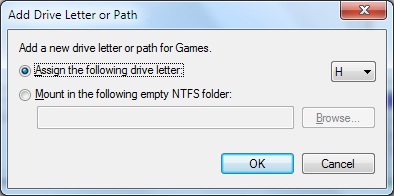
    3. Choose the Change Drive Letters and Paths and select Add to add drive letter or path to the hidden drive.
Add hidden drive
Assign drive letter
     4. At last choose a drive letter to assign the drive/partition and press on OK. Wow! The hidden partition is displayed in an explorer or my computer.

That's it! No data is lost or damage. Even the installed files are working again without any errors. From now you shouldn't need any extra software to hide or unhide your PC's drives. And if it helps you, why don't you share or rate this?

Popular Posts